Customize Your Profile Avatar on AlinkMe
Your profile avatar is one of the first things visitors notice on your AlinkMe page. A well-designed avatar helps you create a strong personal or brand identity.
AlinkMe provides flexible Avatar Type settings, allowing you to choose between using a profile image or creating a stylish initials-based avatar with custom shapes and colors.
🔹 Step 1: Open Profile Icon Settings
- Visit 👉 https://www.alinkme.com
- Login to your account
- Go to Dashboard → Configuration
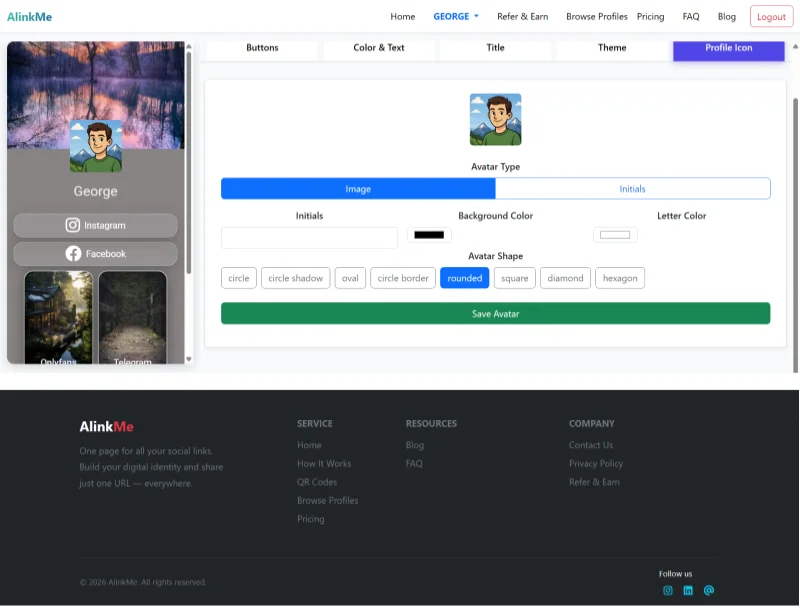
- Click on the Profile Icon tab
Here, you can manage all avatar-related settings.
🔹 Avatar Type Options
AlinkMe gives you two main avatar options:
1. Image Avatar
- Upload your profile picture
- Ideal for personal branding or business identity
- Best for influencers, creators, and companies
2. Initials Avatar
- Use your name initials (e.g., “G”, “JS”)
- Great for minimal and clean design
- Useful if you don’t want to upload an image
🔹 Customize Initials Avatar
If you select Initials, you can customize:
Initials Text
- Enter your name initials
- Example: “A”, “GS”, “MK”
Background Color
- Choose a color for the avatar background
- Match it with your profile theme
Letter Color
- Select the text color for better contrast and visibility
🔹 Avatar Shape Options
You can choose different shapes to match your design style:
- Circle
- Circle Shadow
- Oval
- Circle Border
- Rounded
- Square
- Diamond
- Hexagon
Each shape gives your profile a unique appearance.
🔹 Live Preview Feature
On the left side of the screen, you can see a real-time preview of your profile.
As you update:
- Avatar type
- Colors
- Shape
Your profile updates instantly, helping you choose the best design before saving.
🔹 Save Your Avatar Settings
Once you finalize your design:
- Click Save Avatar
- Your profile will be updated immediately
🔹 Why Avatar Customization Matters
Customizing your avatar helps you:
✔ Build a strong personal brand
✔ Improve profile appearance
✔ Create a professional look
✔ Stand out from other users
✔ Maintain consistency with your theme
🔹 Tips for Best Results
- Use a clear and high-quality profile image
- Choose colors that match your brand
- Keep initials simple and readable
- Use rounded or circle shapes for modern design
🔹 Final Thoughts
AlinkMe makes it easy to create a visually appealing profile with flexible avatar options. Whether you prefer a photo or a clean initials-based design, you can customize everything in just a few clicks.
🔹 Start Customizing Your Profile
👉 Visit https://www.alinkme.com
👉 Go to Profile Icon settings
👉 Customize your avatar and make your profile stand out