Customize Your Subtitle Section on AlinkMe
The Subtitle Section in your AlinkMe profile helps you add a short description below your name. It’s perfect for highlighting who you are, what you do, or what visitors can expect from your profile.
With advanced customization options, you can design your subtitle to match your brand and stand out visually.
🔹 Step 1: Open Subtitle Settings
- Visit 👉 https://www.alinkme.com
- Login to your account
- Go to Dashboard → Configuration
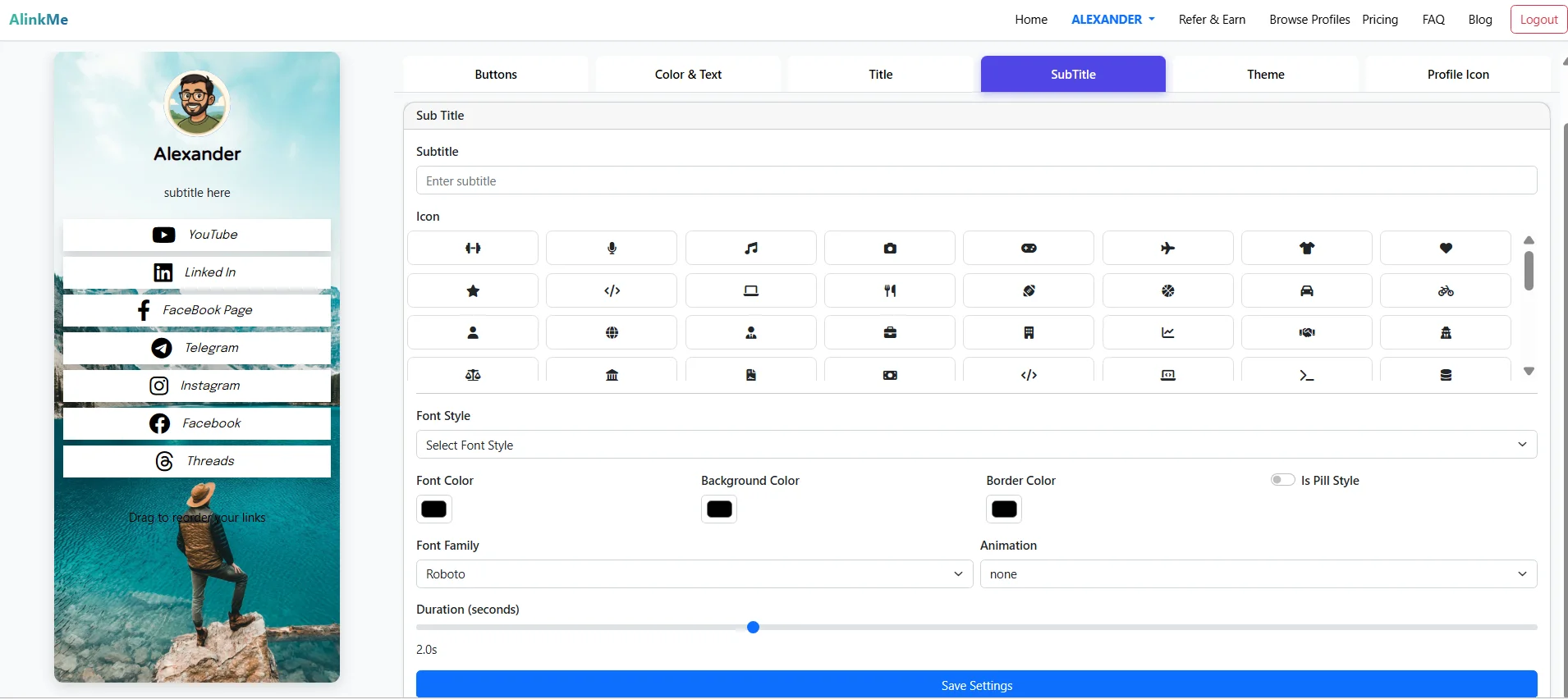
- Click on the Subtitle tab
Here, you can fully customize how your subtitle appears.
🔹 Add Your Subtitle Text
- Enter a short line like:
- Digital Creator | Entrepreneur
- Follow me for daily tips
- Tech | Business | Growth
Keep it short, clear, and engaging.
🔹 Choose an Icon
You can enhance your subtitle with icons such as:
- Music 🎵
- Camera 📷
- Travel ✈️
- Code 💻
- Star ⭐
Icons help make your subtitle visually attractive and easier to understand.
🔹 Customize Font Style & Family
Font Style
- Select a style that matches your branding
Font Family
- Example: Roboto (clean and modern)
Choosing the right font improves readability and professionalism.
🔹 Color Customization
You can fully control the appearance with:
- Font Color – Text color
- Background Color – Subtitle background
- Border Color – Outline of subtitle
Use contrasting colors to ensure visibility.
🔹 Enable Pill Style
- Toggle “Is Pill Style”
- Creates rounded, modern subtitle design
This is great for a clean and stylish UI.
🔹 Add Animation
You can apply animation effects to your subtitle:
- Choose animation type (if available)
- Set duration (seconds)
This makes your profile more dynamic and engaging.
🔹 Live Preview Feature
On the left side, your profile preview updates in real time as you:
- Change subtitle text
- Select icons
- Update colors and fonts
This helps you instantly visualize your design.
🔹 Save Your Settings
Once you're happy with your customization:
- Click Save Settings
- Your subtitle updates instantly on your profile
🔹 Why Subtitle Matters
A well-designed subtitle helps you:
✔ Communicate your identity quickly
✔ Improve profile engagement
✔ Make your profile visually appealing
✔ Build a strong personal brand
✔ Guide visitors on what to expect
🔹 Best Practices
- Keep subtitle under 1–2 lines
- Use relevant icons only
- Maintain consistent colors with theme
- Avoid too many animations
- Ensure text is readable on mobile
🔹 Example Subtitle Ideas
- 🚀 Helping You Grow Online
- 📸 Travel | Lifestyle | Stories
- 💼 Business Tips & Strategies
- 🎯 Learn. Build. Scale.
🔹 Final Thoughts
The Subtitle Section in AlinkMe is a small but powerful feature. With the right combination of text, icons, colors, and animation, you can instantly capture attention and communicate your message effectively.
🔹 Start Customizing Now
👉 Visit https://www.alinkme.com
👉 Go to Subtitle settings
👉 Design your perfect profile subtitle
Make your profile more engaging and professional today.