Create a QR Code for Your Website URL
A QR code for your website makes it easy for users to visit your site instantly with a simple scan. With AlinkMe’s QR Code Generator, you can not only create a QR code for your website URL but also fully customize its design to match your brand.
The platform gives you advanced design controls along with a live preview, so you can see exactly how your QR code will look before sharing it.
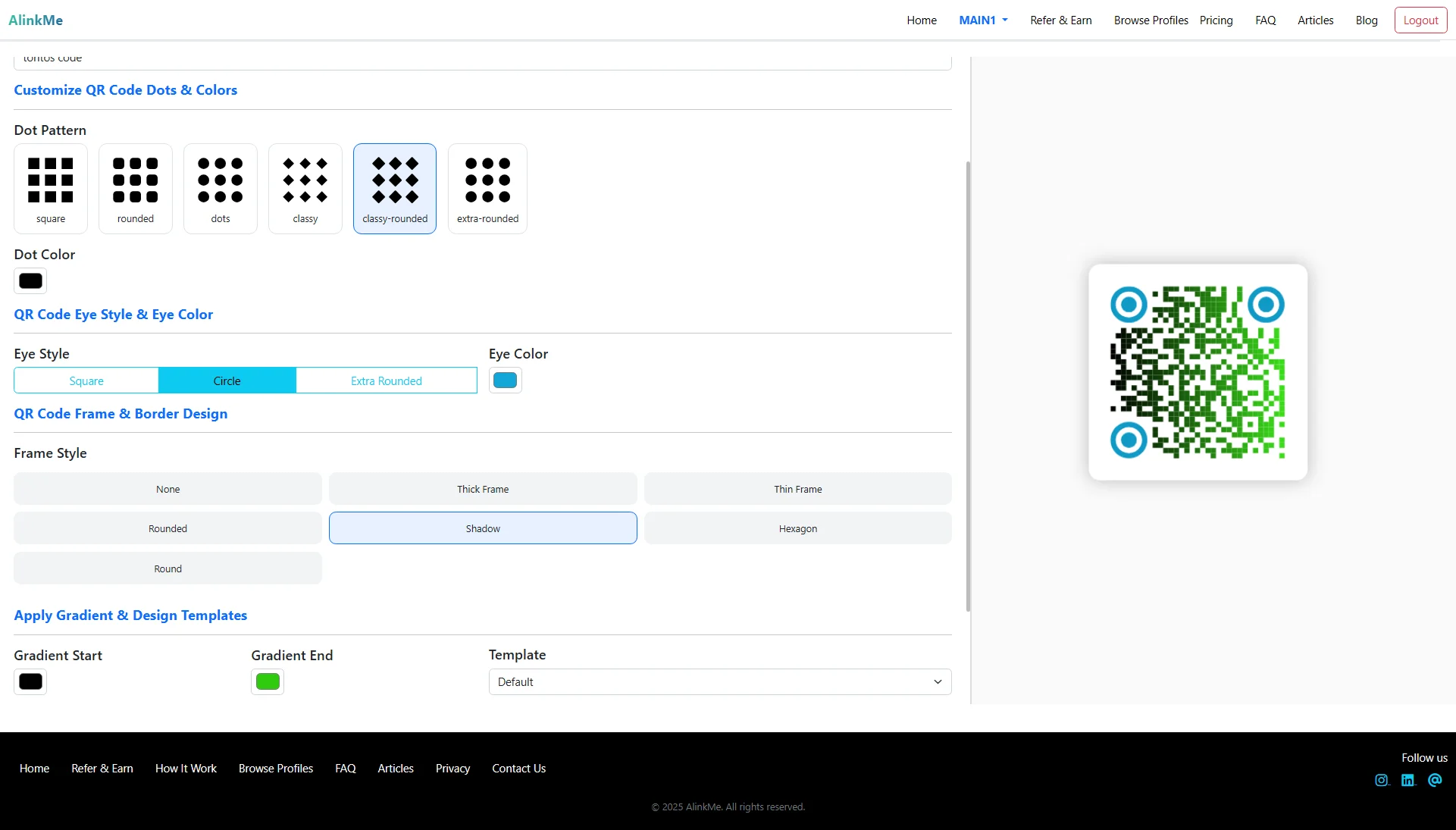
🔹 Customize QR Code Dots & Colors
You can personalize the QR code pattern using different Dot Patterns, including:
-
Square
-
Rounded
-
Dots
-
Classy
-
Classy Rounded
-
Extra Rounded
You can also select a custom dot color to match your website branding.
🔹 QR Code Eye Style & Eye Color
The eye elements (corner markers) of the QR code can be customized with different styles such as:
-
Square
-
Circle
-
Extra Rounded
You can also choose a unique eye color to make your QR code more visually attractive.
🔹 Frame & Border Design Options
Make your QR code stand out with frame styles like:
-
None
-
Thick Frame
-
Thin Frame
-
Rounded
-
Shadow
-
Hexagon
-
Round
Frames are useful when placing QR codes on posters, product packaging, business cards, or websites.
🔹 Apply Gradient & Design Templates
You can enhance your QR code with:
-
Gradient Start Color
-
Gradient End Color
-
Ready-to-use Templates
Gradient QR codes are ideal for modern branding and digital promotions.
🔹 Live Preview Before Download
One of the most powerful features is the real-time preview panel on the right side.
As you update dot styles, colors, eye design, or frame settings, the QR code updates instantly. This ensures your final QR code looks exactly how you want it before sharing or downloading.
🔹 Why Create a Website QR Code?
A website URL QR code helps you:
✔ Drive traffic to your website instantly
✔ Add QR codes to business cards and brochures
✔ Improve offline-to-online marketing
✔ Share links quickly without typing URLs
✔ Enhance brand visibility with custom design
🔹 Where to Use Website QR Codes
-
Business Cards
-
Flyers & Posters
-
Product Packaging
-
Restaurant Tables
-
Event Stands
-
Digital Presentations
🔹 Create Your Website QR Code Today
With AlinkMe, creating a fully customized QR code for your website takes just minutes.
👉 Enter your website URL
👉 Customize design elements
👉 Preview instantly
👉 Download and share anywhere
Start generating your professional website QR code today.